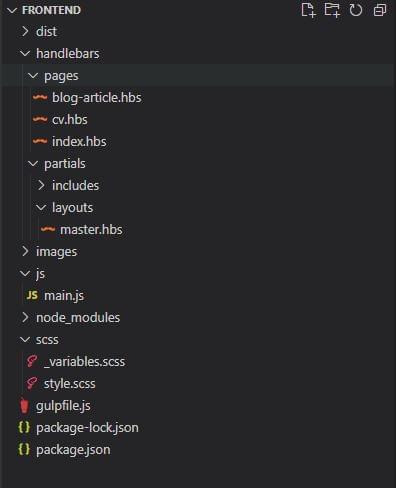
While constructing a website with Umbraco 9, I explored frontend development and selected Gulp 4.0.2 as my task runner. The required tasks included:
- SCSS Task - Compile SASS files into minified CSS in the dist folder
- JavaScript Task - Combine multiple JS files into minified output
- Image Squash - Compress images and copy to dist
- Handlebars To HTML - Convert Handlebars templates and partials to HTML
- Watch/Live Reloading - Monitor file changes and auto-refresh browsers
Node.js Installation
The first step is to install Node.js, you can do this by downloading and installing Node.js from their website at https://nodejs.org/. This provides access to NPM (Node Package Manager).
NPM Package Installation
Required packages include gulp, gulp-sass, sass, gulp-clean-css, gulp-uglify, browser-sync, gulp-compile-handlebars, gulp-rename, and gulp-imagemin. Install them with:
npm install gulp gulp-sass sass gulp-clean-css gulp-uglify browser-sync gulp-compile-handlebars gulp-rename gulp-imagemin --save-devSCSS Task
This task pipes SCSS through conversion, minification, and outputs to the dist/css folder with sourcemaps enabled:
function scss() {
    return src('scss/**/*.scss')
        .pipe(sass().on('error', sass.logError))
        .pipe(cleanCss())
        .pipe(dest('dist/css'));
}
JavaScript Task
This takes the src main.js file specified and runs it through the uglify() pipe which minifies and compresses the JavaScript file:
function js() {
    return src('js/main.js')
        .pipe(uglify())
        .pipe(dest('dist/js'));
}
Image Squash
Images from specified folders are compressed using gulp-imagemin and copied to dist/images:
function imgSquash() {
    return src('images/**/*')
        .pipe(imagemin())
        .pipe(dest('dist/images'));
}
Handlebars to HTML
The hbsToHtml task took a little bit more time to configure correctly, but is an extremely powerful tool for building structured frontend sites with layouts and partials:
function hbsToHtml() {
    var templateData = {};
    var options = {
        batch: ['./src/partials']
    };
    return src('src/*.hbs')
        .pipe(handlebars(templateData, options))
        .pipe(rename({ extname: '.html' }))
        .pipe(dest('dist'));
}
Browser Sync
Browser-sync initialises a local server from the dist directory and provides automatic page reloading functionality:
function serve() {
    browserSync.init({
        server: { baseDir: './dist' }
    });
}
Watch Tasks
Two watch tasks monitor Handlebars files and SCSS/JS/image files, triggering appropriate functions and browser reloads:
function watchHbs() {
    watch('src/**/*.hbs', series(hbsToHtml)).on('change', browserSync.reload);
}

function watchFiles() {
    watch('scss/**/*.scss', series(scss)).on('change', browserSync.reload);
    watch('js/**/*.js', series(js)).on('change', browserSync.reload);
    watch('images/**/*', series(imgSquash)).on('change', browserSync.reload);
}
Default and Dev Tasks
To launch the frontend project into your default browser you can run gulp at the root using PowerShell or CMD. A separate gulp dev task generates dist files for backend project integration:
exports.default = series(scss, js, imgSquash, hbsToHtml, parallel(serve, watchHbs, watchFiles));
exports.dev = series(scss, js, imgSquash);